Everything clients can use
The complete system,
on this one page.
Start with the full picture. Every major feature is visible here before the detailed tour, with a realistic working day further down the page.
☰A calm expandable menu
Open the dark-blue left menu when you need it and collapse it for more working space. Only configured platforms appear.
☀Your agenda today
Proper requests from recognised contacts, ordered by Important, Business, Personal and See later. Likes, promotions and automated notices stay in the full feed.
≡One unified activity feed
Messages, comments, mentions and inbox activity share one newest-first reading direction.
↩Reply where access is proven
Authorised read-and-reply routes keep the response in SM Crawler. Clearly labelled view-only items open the exact official app or page.
⌁Floating conversations
Keep several draggable conversation windows open without losing the agenda underneath.
☎Normal phone calls
Search contacts, choose a person and keep You and the caller visible in an in-app voice window.
WAWhatsApp calls and groups
Start voice, face or group calls from searchable WhatsApp contacts and keep the call room inside the page.
TTeams calls and meetings
Select one or several people, create a meeting, review each delivery and send links by email or WhatsApp.
↗Incoming calls and call waiting
Answer phone or WhatsApp Business calls, or send a reviewed “call you later” reply when already speaking.
✓Remove, Done and follow-up
Remove stays visible on every message. Done remains in the mouse-over actions, and either choice clears every active view while preserving history.
⌕People, search and archive
Find contacts, conversations and supported earlier history without breaking the working-day view.
◎Your real contact sources
Every chooser refreshes from Mac/iCloud Contacts, linked WhatsApp, connected email and available platform activity—and labels the source beside each person.
!Freshness and useful alerts
Each connection says when it last reported and gives plain recovery guidance when attention is needed.
▦Arrange messages everywhere
Arrange any feed by Per day, Person / group, Important, Type or Native order. Every displayed group can be removed in one click.
✦Ask ChatGPT
Prepare a useful question in a floating window and continue with the official free ChatGPT service.
⌾Simple sign-in and QR access
Use one clear username and password, or pair a phone or tablet with a short-lived QR code.
▣Mac, PC, Linux, phone and tablet
The same private system opens across desktop, Android, iPhone and iPad without a different workflow.
⌂Private, owner-controlled system
The working platform runs on the owner’s computer; account connections and stored activity remain under that owner’s control.
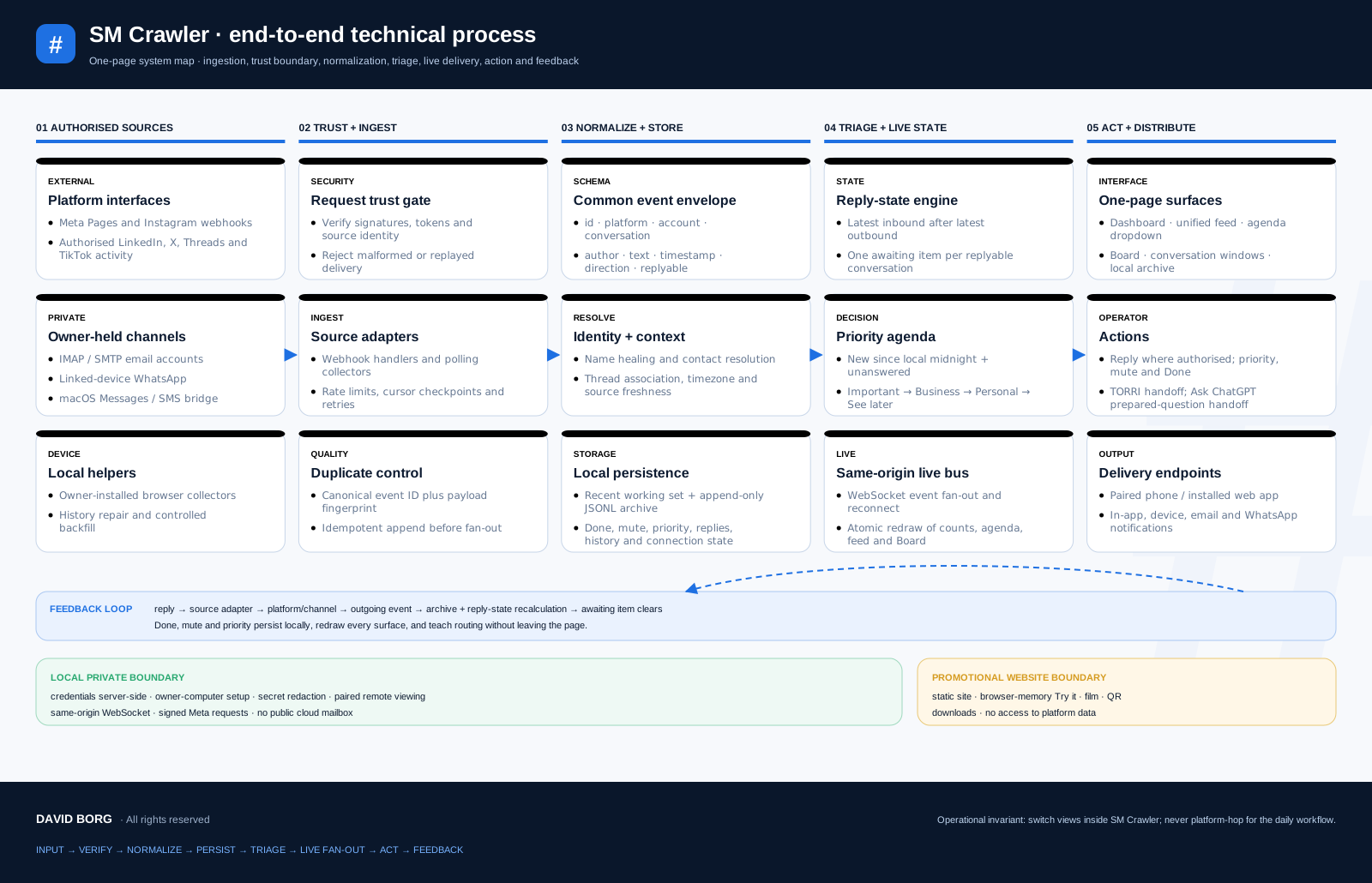
This is the whole feature map. Continue down for the narrated film, call experience, working screens, supported sources, architecture and installation.
Open the detailed features page →